Master Controller II (PC)
Overview
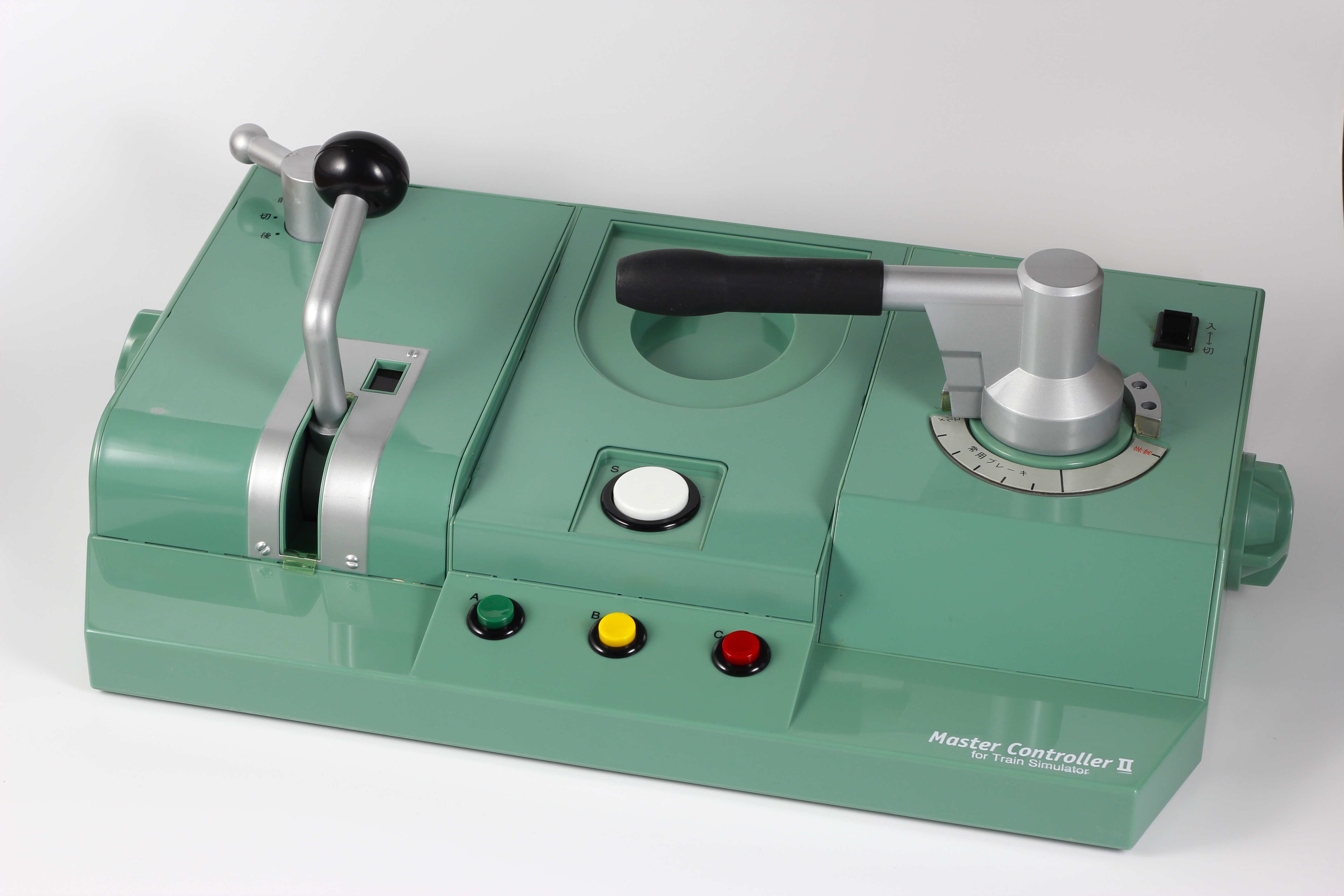 | Name | Master Controller II (PC) |
| Release date | December 17, 1999 | |
| Serial code | VOK-00106 | |
| Notes |
Supported software
| Software | Notes | |
|---|---|---|
| ✓ | Hmmsim Metro (PC - Windows) | Set power to 4 and brake to 7. |
| ✓ | Train Crew (PC - Windows) | Requires plugin from official website. Set power to 5 and brake to 7. |
| ✓ | Train Simulator (PC - Windows) | Many entries require companion software to use the controller. |
| ✓ | Train Simulator + Densha de GO!: Tokyu Line (Sony PlayStation 2) | Requires official USB adapter. Set power to 4 and brake to 7. |
| ✓ | Train Simulator PLUS (PC - Windows) | |
| ✓ | Train Simulator Real: THE Keihin Electric Express Railway (Sony PlayStation 2) | Requires official USB adapter. Set power to 5 and brake to 5. |
| ✓ | Train Simulator Real: THE Yamanote Line (Sony PlayStation 2) | Requires official USB adapter. Set power to 5 and brake to 8. |
| ✓ | Train Simulator: Keisei, Toei Asakusa, Keikyu Lines (Sony PlayStation 2) | Requires official USB adapter. Set power to 5 and brake to 5. |
| ✓ | Train Simulator: Kyūshū Shinkansen (Sony PlayStation 2) | Requires official USB adapter. Set power to 5 and brake to 7. |
| ✓ | Train Simulator: Midōsuji Line (Sony PlayStation 2) | Requires official USB adapter. Set power to 4 and brake to 6. |
Technical details
This controller has two handles (power and brake, both with adjustable notches), a reverser switch with 3 positions (F, N, B) and 4 buttons (S, A, B, C). It was manufactured by Pony Canyon. It requires external power to work, either with an included power supply or 4 AA-sized batteries. It also supports connecting an included pedal.
It connects to PC via serial cable, either directly via a DE-9 connector or with a USB adapter.
| Baud rate | 19200 |
| Data bits | 8 |
| Parity | None |
| Stop bits | 1 |
| Flow control | None |
Unlike other controllers, the notches in the two handles are adjustable. There are two knobs, one on each side of the controller, to adjust the number of power and brake notches. This change can be done with the controller turned off. Next to the power handle there is a LED screen showing the current notch, and the notch print beside the brake handle can also be changed to match the current gear setting.
The power handle supports 3 to 6 notches, plus EX (6 notches without click). The brake handle supports 5 to 8 notches, plus EX (8 notches without click).
The two handles are interlocked; it is not possible to apply power and brakes at the same time.
Input
The controller sends 5-character events separated by a carriage return (ASCII 0xD).
Events for the handles are the following.
| Notch | Event |
|---|---|
| Emergency | TSB20 |
| B8 | TSB30 |
| B7 | TSB40 |
| B6 | TSE99 |
| B5 | TSA05 |
| B4 | TSA15 |
| B3 | TSA25 |
| B2 | TSA35 |
| B1 | TSA45 |
| N | TSA50 |
| P1 | TSA55 |
| P2 | TSA65 |
| P3 | TSA75 |
| P4 | TSA85 |
| P5 | TSA95 |
| P6 | TSB60 |
Events for the reverser are the following.
| Position | Event |
|---|---|
| Forward | TSG99 |
| Neutral | TSG50 |
| Backward | TSG00 |
Events for the buttons are the following. The first event is reported when the button is pressed, and the second one when the button is released.
Events for the buttons are the following. One event is reported when the button is pressed, and another event when the button is released.
| Button | Press Event | Release Event |
|---|---|---|
| S | TSK99 | TSK00 |
| A | TSX99 | TSX00 |
| B | TSY99 | TSY00 |
| C | TSZ99 | TSZ00 |